Field Configuration Examples
Production facilities may differ from field to field. Let’s look at the following diagram, as an example of one possible configuration to illustrate how a set of production facilities might connect to well test equipment. A typical field configuration might contain the following elements:
- multiple wells in the main production line
- a single multi-switch valve (MSV)
- a single test facility (separator)
- a single PLC/RTU
The sequencing of steps that a field device must take to move wells in and out of well test mode can be controlled in one of two places:
- Host — in this configuration, the field device must be told what steps to take and when. This configuration is called Host-Based Configuration. In this mode, the host system (such as CygNet) is configured with the sequencing of commands and controls that get sent and received from the field devices being tested.
- Device — in this configuration, the field device itself is configured with all the sequencing logic necessary to move wells in and out of test mode. This configuration is called Device-Based Configuration. In this case, the SCADA host is mostly monitoring the actions of the device and processing results as necessary.
The diagram below shows a sample production facility displaying field elements. In this example, multiple production wells are connected to a single multi-switch valve device (known as the header), which in turn is connected to a test separation facility. The main purpose of the switching device is to set each valve to the right position to connect to the test facility port. Each well goes into test for a designated period, while all the other wells remain in the main production line, until the test is complete. Once testing on one well is completed, then the next well goes into the testing phase.
The equipment doing the metering (the actual testing) might be a test separator, multiphase flow meter, net oil computer (NOC), or another device retrieving and calculating test data.
|
Production Facility Example with a Single Header |
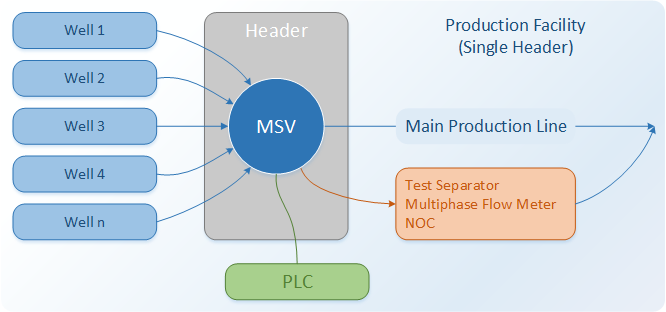
The simple Well Test configuration describe above uses the term Header to mean a grouping of wells in a single test facility. Each header must have a unique identifier, called a position, for each well in the header/testing facility.
When a well is to be tested, the MSV needs to be configured such that the well to be tested is flowing through the correct port that is isolated from the other wells so that proper calculation of flow can be determined.
- In host-based configurations, the host is managing this sequencing to the PLC.
- In device-based configurations, the device is managing the sequencing and the host is monitoring the operation.
Multiple or Parallel Headers
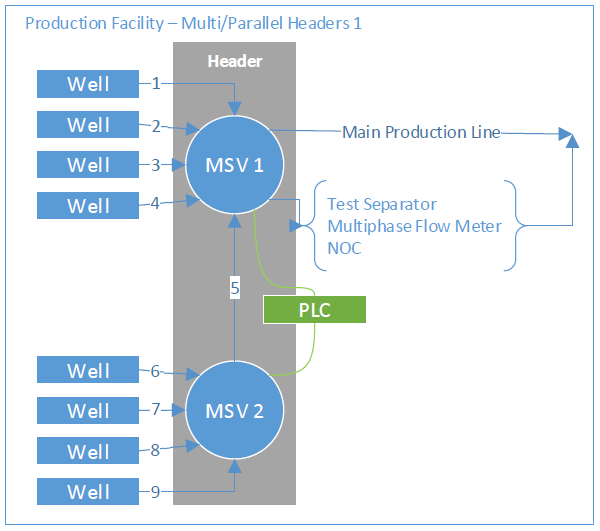
In a field configuration where there are more wells than there are ports on a single MSV, cascaded or parallel MSVs are needed.
Let’s look at the following diagrams, as an examples of other possible configurations to illustrate how a set of production facilities might connect to well test equipment. These configurations might contain the following elements:
- multiple wells in the main production line
- two or more multi-switch valves (MSV)
- a single test facility (separator)
- a single PLC/RTU
|
Production Facility Example with Two Headers |
|
Production Facility Example with Three Headers |
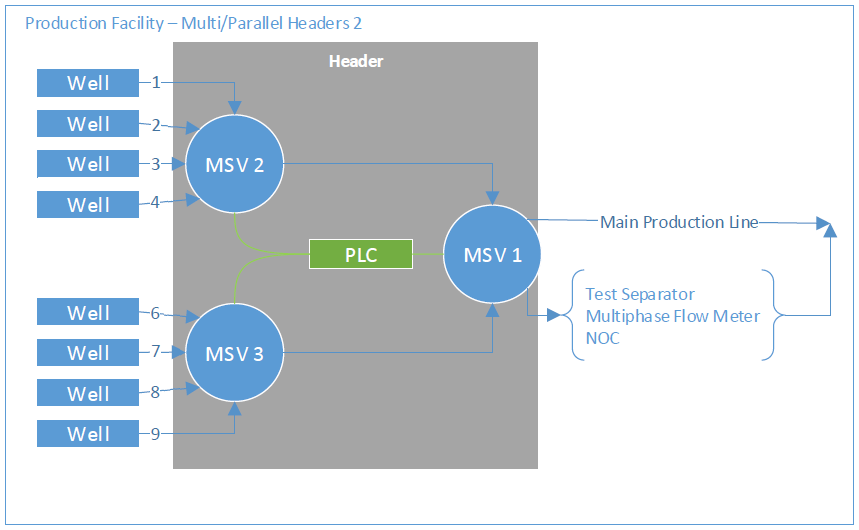
The only difference between these configurations and the first example is the number and sequencing of commands needed to test a specific well. The concept remains the same: the PLC will need to control the connected MSVs to configure them appropriately for a well isolated for testing. The CygNet Well Test module supports a variety of field configurations.

